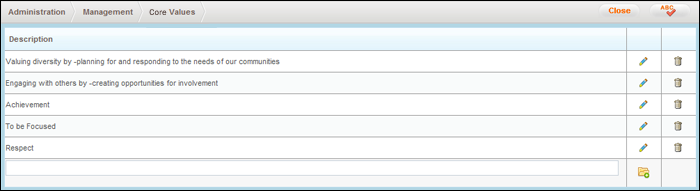
This page displays a list of the organisation's Core Values and allows the Administrator to create, modify and remove Core Values as required.
STEP 1: Go to Administration > Individual Planning Admin > Management > Core Values.
STEP 2: Enter the requisite information as described below.
|
Field |
Description / Instructions |
Mandatory / Optional |
|
Description |
A short phrase or sentence describing the core value |
Mandatory |
STEP 3: Create a new core value by clicking 'Add'.
|
|
Core Values that are included in an assessment cannot be deleted. |
Copyright © 2014-2015 CAMMS Online Help. All rights reserved.
Last revised: September 23, 2018
